


Battery Replacement
Replace the battery if the REPLACE BATTERY IN REMOTE KEY message appears in the DIC. See “REPLACE BATTERY IN REMOTE KEY” under DIC Warnings and Messages for additional information.
Notice: When replacing the battery, do not touch any of the circuitry on the transmitter. Static from your body could damage the transmitter.
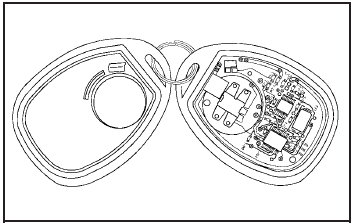
To replace the battery:
1. Separate the transmitter with a flat, thin object inserted into the notch on the side.
2. Remove the old battery. Do not use a metal object.
3. Insert the new battery, positive side facing down.
Replace with a CR2032 or equivalent battery.
4. Snap the transmitter back together.
See also:
Customer Assistance Offices (U.S. and Canada)
Buick encourages customers to call
the toll-free number for assistance.
However, if a customer wishes to
write or e-mail Buick, the letter
should be addressed to:
United States
Buick Customer ...
Increasing Speed While UsingCruise Control
There are two ways to go to a higher speed:
• Use the accelerator pedal to get to the higher
speed. Press the button at the end of the
lever, then release the button and the
accelerator pedal. ...
How to Reset the Engine Oil Life
System
The Engine Oil Life System calculates when to change
the engine oil and filter based on vehicle use. Whenever
the oil is changed, reset the system so it can calculate
when the next oil change is ...