


Driver Information Center (DIC)
The DIC display is located at the bottom of the instrument panel cluster. It shows the status of many vehicle systems and enables access to the personalization menu.
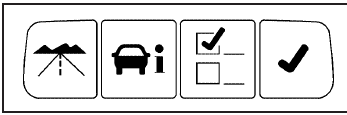
The DIC buttons are located on the instrument panel to the left of the instrument panel cluster.
 : Press to scroll through the trip
and fuel displays.
: Press to scroll through the trip
and fuel displays.
 : Press to scroll through the
vehicle information
displays.
: Press to scroll through the
vehicle information
displays.
 : Press to customize the feature
settings on your
vehicle. See DIC Vehicle Customization
for more information.
: Press to customize the feature
settings on your
vehicle. See DIC Vehicle Customization
for more information.
 : Press to reset certain DIC
features and to
acknowledge DIC warning messages and clear them
from the display.
: Press to reset certain DIC
features and to
acknowledge DIC warning messages and clear them
from the display.
For more information, see Driver Information Center (DIC).
Vehicle Customization
Some vehicle features can be programmed by using the
DIC buttons on the instrument panel to the left of the
steering wheel. These features include:
• Language
• Door Lock and Unlock Settings
• Lighting
• Chime Volume
• Memory Settings
• Remote Start
See DIC Vehicle Customization.
See also:
Radio Frequency Statement
This vehicle has systems that operate on a radio frequency that comply with Part
15 of the Federal Communications Commission (FCC) rules and with Industry Canada
Standards RSS-GEN/210/220/310.
Op ...
If a Crash Occurs
If there has been an injury, call
emergency services for help. Do not
leave the scene of a crash until all
matters have been taken care of.
Move the vehicle only if its position
puts you in d ...
Reporting Safety Defects to General
Motors
In addition to notifying NHTSA (or Transport Canada) in
a situation like this, please notify General Motors.
Call 1-800-521-7300, or write:
Buick Customer Assistance Center
P.O. Box 33136
Detroi ...