


Driver Efficiency Gauge
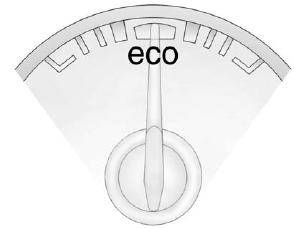
For eAssist vehicles, this gauge assists in driving efficiently and will vary based on driver input.
To maximize efficiency, keep the gauge pointed in the solid green zone in the center of the gauge.
The gauge moves to the left when braking and to the right when accelerating. When either is done aggressively, the vehicle is being driven less efficiently and the gauge will move further from the center.
See also:
Base Headlamp Assembly
The base model vehicle has a
halogen high-beam headlamp, a
low-beam/Daytime Running Lamp
(DRL) headlamp, and a turn signal/parking lamp on the headlamp
assembly.
For replacement of the turn s ...
Recording from MP3/WMA
Discs or USB Storage Devices
USB Host Support
The USB connector uses the USB
standards, 1.1 and 2.0.
USB Supported Devices
• USB Flash Drives
• Portable USB Hard Drives
Recording to MEM
Press REC , then select Record ...
Distracted Driving
Distraction comes in many forms and can take your focus from the task of driving.
Exercise good judgment and do not let other activities divert your attention away
from the road. Many local govern ...