


Lumbar Adjustment
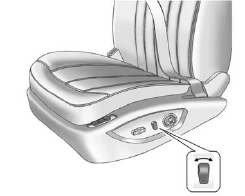
Lumbar Adjustment
To adjust the lumbar support, if available:
• Press and hold the front or rear of the control to increase or decrease lumbar support.
• Press and hold the top or bottom of the control to raise or lower lumbar support.
See Lumbar Adjustment.
See also:
OnStar®
OnStar® uses several innovative technologies and live
advisors to provide a wide range of safety, security,
navigation, diagnostics, and calling services. ...
Roadside Assistance Program
U.S.: 1-800-252-1112
TTY Users: 1-888-889-2438
Canada: 1-800-268-6800
As the owner of a new Buick, you are automatically
enrolled in the Roadside Assistance program. This
program provides techn ...
Driving on Snow or Ice
Drive carefully when there is snow or ice between the tires and the road, creating
less traction or grip. Wet ice can occur at about 0°C (32°F) when freezing rain
begins to fall, resulting in ev ...