


License Plate Lamp
To replace one of these bulbs:
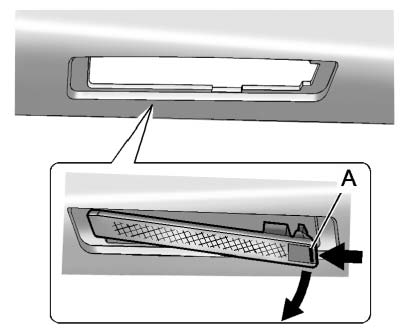 Passenger Side Shown, Driver Side Similar
1. Push the release tab (A) toward the lamp assembly.
2. Pull the lamp assembly down to remove.
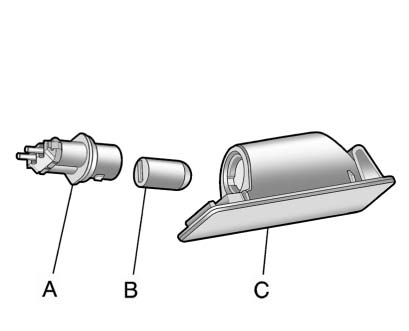
A. Bulb Socket
B. Bulb
C. Lamp Assembly
3. Turn the bulb socket (A) counterclockwise to remove it from the lamp assembly (C).
4. Pull the bulb (B) straight out of the bulb socket.
5. Push the replacement bulb straight into the bulb socket and turn the bulb socket clockwise to install it into the lamp assembly.
6. Push the lamp assembly back into position until the release tab locks into place.
See also:
Lower Anchors
Lower Anchors
Lower anchors (A) are metal bars
built into the vehicle. There are two
lower anchors for each LATCH
seating position that will
accommodate a child restraint with
lower attac ...
MP3 Format
There are guidelines that must be
met, when creating an MP3 disc or
the CD might not play.
The guidelines are:
• Sampling rate: 8 kHz, 16 kHz,
22.05 kHz, 24 kHz, 32 kHz,
44.1 kHz, and 48 k ...
Services Not Included in Roadside
Assistance
• Impound towing caused by violation of any laws.
• Legal fines.
• Mounting, dismounting or changing of snow tires,
chains, or other traction devices.
• Towing or services for vehicles dr ...