


Removal and Installation of the Sealant Canister
To remove the sealant canister:
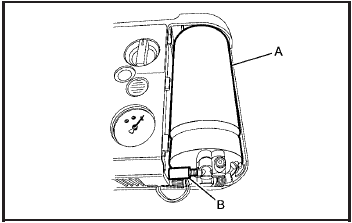
1. Remove the plastic cover.
2. Unscrew the connector (B) from the canister (A).
3. Pull up on the canister (A) to remove it.
4. Replace with a new canister which is available from your dealer/retailer.
5. Push the new canister into place.
6. Screw the connector (B) to the canister (A).
7. Slide the plastic cover back on.
See also:
Service All-Wheel Drive Light
This light should come
on briefly when you turn
on the ignition, as a
check to show you it
is working.
The service all-wheel drive light comes on to
indicate that there may be a problem with ...
Radiator Pressure Cap
Notice: If the pressure cap is not tightly
installed, coolant loss and possible engine
damage may occur. Be sure the cap is properly
and tightly secured. ...
Safety System Check
Now and then, check that the safety
belt reminder light, safety belts,
buckles, latch plates, retractors, and
anchorages are all working properly.
Look for any other loose or
damaged safety b ...