


Tire and Loading Information Label
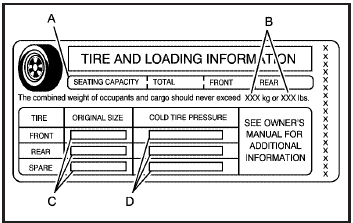
Label Example
A vehicle specific Tire and Loading Information label is attached to the vehicle’s center pillar (B-pillar). With the driver door open, you will find the label attached below the door lock post (striker).
The Tire and Loading Information label lists the number of occupant seating positions (A), and the maximum vehicle capacity weight (B) in kilograms and pounds. The vehicle capacity weight includes the weight of all occupants, cargo, and all nonfactory-installed options.
The Tire and Loading Information label also lists the tire size of the original equipment tires (C) and the recommended cold tire inflation pressures (D). For more information on tires and inflation, see Tires and Inflation - Tire Pressure.
There is also important loading information on the Certification label. It tells you the Gross Vehicle Weight Rating (GVWR) and the Gross Axle Weight Rating (GAWR) for the front and rear axle, see “Certification Label” later in this section.
See also:
Safety
Optional side curtain-type airbags incorporate a new rollover sensing system
for 2006. All seating positions have three-point safety belts, and all-disc
antilock brakes are standard. GM's StabiliT ...
Automatic Transmission Fluid
How to Check Automatic Transmission Fluid
It is not necessary to check the transmission fluid level. A transmission fluid
leak is the only reason for fluid loss. If a leak occurs, take the vehicle ...
Key and Lock Messages
REPLACE BATTERY IN REMOTE KEY
This message displays when the battery in the Remote Keyless Entry (RKE) transmitter needs to be replaced. ...