


Electric Parking Brake Light
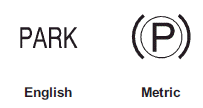
The parking brake status light comes on when the brake is applied. If the light continues flashing after the parking brake is released, or while driving, there is a problem with the Electric Parking Brake system. A SERVICE PARKING BRAKE message may also display on the Driver Information Center (DIC). See Brake System Messages for more information.
If the light does not come on, or remains flashing, see your dealer

The brake warning light should come on briefly when the ignition is placed in ON/RUN. If it does not come on, have the vehicle serviced by your dealer.
If this light comes on, there is a problem with a system on the vehicle that is causing the parking brake system to work at a reduced level. The vehicle can still be driven, but should be taken to a dealer as soon as possible. See Parking Brake for more information.
See also:
Battery Voltage
This display, available on some
vehicles, shows the current battery
voltage. If the voltage is in the
normal range, the value will display.
For example, the display may read
Battery Voltage 1 ...
Halogen Bulbs
WARNING
Halogen bulbs have pressurized gas inside and can burst if you drop or scratch the bulb. You or others could be injured. Be sure to read and follow the instructions on the bulb package. ...
Replacing Airbag System Parts after a Crash
WARNING
A crash can damage the airbag systems in the vehicle.
A damaged airbag system may not work properly and may not protect you and your passenger(s) in a crash, resulting in serious injury o ...