


Passenger Airbag Status Indicator
The vehicle has a passenger sensing system. See Passenger Sensing System for important safety information.
The instrument panel has a passenger airbag status indicator.
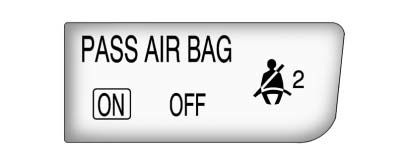
When the vehicle is started, the passenger airbag status indicator will light the words ON and OFF for several seconds as a system check.
Then, after several more seconds, the status indicator will light either the word ON or OFF to let you know the status of the right front passenger frontal airbag and seat-mounted side impact airbag.
If the word ON is lit on the passenger airbag status indicator, it means that the right front passenger frontal airbag and seat-mounted side impact airbag are enabled (may inflate).
If the word OFF is lit on the airbag status indicator, it means that the passenger sensing system has turned off the right front passenger frontal airbag and seat-mounted side impact airbag.
If, after several seconds, both status indicator lights remain on, or if there are no lights at all, there may be a problem with the lights or the passenger sensing system.
See your dealer for service.
 WARNING
If the airbag readiness light ever comes on and stays on, it means that something may be wrong with the airbag system. To help avoid injury to yourself or others, have the vehicle serviced right away. See Airbag Readiness Light for more information, including important safety information.
See also:
Removing a CD or DVD
Press .
The disc is pushed out of the CD/DVD slot.
If the disc is not removed after it is
ejected, it is pulled back in after a
few seconds. ...
Fuel
Use of the recommended fuel is an
important part of the proper
maintenance of this vehicle. To help
keep the engine clean and maintain
optimum vehicle performance, we
recommend the use of ga ...
Securing a Child Restraint Designed for the LATCH System
WARNING
If a LATCH-type child restraint is not attached to anchors, the child restraint will not be able to protect the child correctly. In a crash, the child could be seriously injured or killed. ...