


Instrument Cluster
Buick Verano / Buick Verano Owners Manual / Instruments and Controls / Warning Lights, Gauges, and Indicators / Instrument Cluster
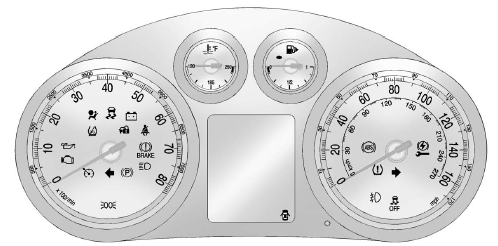
English Cluster Shown, Metric Similar
See also:
Ejecting a Disc (DVD Player with Sunroof)
Press and hold the stop/eject button for more
than two seconds on the DVD player faceplate to
eject the disc. There is not an eject button on
the remote control.
If a disc is ejected from the pl ...
Where Are the Airbags?
The driver frontal airbag is in the middle of the steering wheel.
The right front passenger frontal airbag is in the instrument panel on the passenger side.
Driver Side Shown, Passenger Side Simi ...
Conference Calling
Conference calling and three-way calling must be supported on the Bluetooth phone
and enabled by the wireless service carrier to work.
To start a conference while in a current call:
1. Turn or pre ...