


Removal and Installation of the Sealant Canister
To remove the sealant canister:
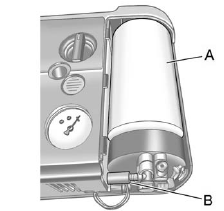
1. Remove the plastic cover.
2. Unscrew the connector (B) from the canister (A).
3. Pull up on the canister (A) to remove it.
4. Replace with a new canister which is available from your dealer.
5. Push the new canister into place.
6. Screw the connector (B) to the canister (A).
7. Slide the plastic cover back on.
See also:
Tire Pressure Light
This light will come on
briefly when you turn
the ignition to RUN.
This light will also come on when one or more of
your tires are significantly underinflated.
A CHECK TIRE PRESSURE DIC mes ...
Customization Button
(Customization): Press
the customization
button to access the VEHICLE SETTINGS menu
and customize the settings to your vehicle. ...
Sending a Stored Name Tag During a Call
1. Press . The system responds
with “Ready”
followed by a tone.
2. Say “Send name tag.” The system responds with
“Say a name tag to send tones” followed by a tone.
3. Say the name ...