


Universal Remote System Programming
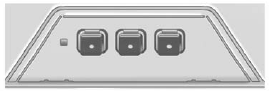
If the vehicle has this feature, you will see these buttons with one LED indicator next to them in the overhead console.
This system provides a way to replace up to three remote control transmitters used to activate devices such as garage door openers, security systems, and home automation devices.
Do not use the Universal Remote system with any garage door opener that does not have the stop and reverse feature. This includes any garage door opener model manufactured before April 1,1982.
Read the instructions completely before attempting to program the Universal Remote system. Because of the steps involved, it may be helpful to have another person available to assist with programming the Universal Remote system.
Keep the original hand-held transmitter for use in other vehicles as well as for future Universal Remote system programming. It is also recommended that upon the sale of the vehicle, the programmed Universal Remote system buttons be erased for security purposes.
See “Erasing Universal Remote System Buttons” later in this section.
When programming a garage door, park outside of the garage. Park directly in line with and facing the garage door opener motor-head or gate motor-head. Be sure that people and objects are clear of the garage door or gate being programmed.
It is recommended that a new battery be installed in the hand-held transmitter for quicker and more accurate transmission of the radio-frequency signal.
See also:
Reporting Safety Defects to theCanadian Government
If you live in Canada, and you believe that your
vehicle has a safety defect, you should
immediately notify Transport Canada, in addition
to notifying General Motors of Canada Limited.
You may c ...
Delayed Locking
When locking the doors with the
power lock switch and a door is
open, the doors will lock
five seconds after the last door is
closed. You will hear three chimes
to signal that the delayed lo ...
Pulling a Trailer
Here are some important points:
• There are many laws, including
speed limit restrictions that apply
to trailering. Check for legal
requirements.
• Do not tow a trailer at all during
the ...