


DIC Buttons
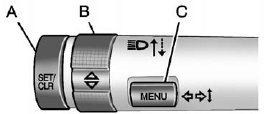
A. SET/CLR: Press to set or clear the menu item when it is displayed.
B.  (Thumbwheel): Use to
scroll through the items in each
menu. A small marker will move
across the bottom of the page
as you scroll through the items.
(Thumbwheel): Use to
scroll through the items in each
menu. A small marker will move
across the bottom of the page
as you scroll through the items.
This shows where each page is in the menu.
C. MENU: Press to get to the Trip/Fuel Menu and the Vehicle Information Menu.
See also:
Manual Seats
WARNING:
You can lose control of the vehicle if you try to
adjust a manual driver’s seat while the vehicle is
moving. The sudden movement could startle and
confuse you, or make you push a ped ...
Maintenance Record
After the scheduled services are performed, record the date, odometer
reading, who performed the
service, and the type of services performed in the boxes provided.
Any additional information from ...
Technology and notable features
Buick's first truck in its lineup since 1923, the Rendezvous was billed as a
combination of the best attributes of a minivan (large cargo capacity, seating
for up to seven), a luxury automobile (r ...