


DIC Buttons
The buttons are the trip/fuel, vehicle information, customization, and set/reset buttons. The button functions are detailed in the following pages.
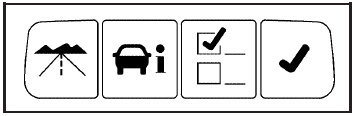
 (Trip/Fuel): Press this button
to display the
odometer, trip odometers, fuel range, average economy,
instantaneous economy, and average speed.
(Trip/Fuel): Press this button
to display the
odometer, trip odometers, fuel range, average economy,
instantaneous economy, and average speed.
 (Vehicle Information): Press this
button to display
the oil life, units, park assist on vehicles with this
feature, side blind zone alert on vehicles with this
feature, tire pressure readings on vehicles with
this feature, compass zone and compass calibration on
vehicles with this feature, and Remote Keyless Entry
(RKE) transmitter programming.
(Vehicle Information): Press this
button to display
the oil life, units, park assist on vehicles with this
feature, side blind zone alert on vehicles with this
feature, tire pressure readings on vehicles with
this feature, compass zone and compass calibration on
vehicles with this feature, and Remote Keyless Entry
(RKE) transmitter programming.
 (Customization): Press this button
to customize the
feature settings on your vehicle. See DIC Vehicle
Customization for more information.
(Customization): Press this button
to customize the
feature settings on your vehicle. See DIC Vehicle
Customization for more information.
 (Set/Reset): Press this button to
set or reset certain
functions and to turn off or acknowledge messages
on the DIC.
(Set/Reset): Press this button to
set or reset certain
functions and to turn off or acknowledge messages
on the DIC.
See also:
Overview (Radio with CD)
Overview (Radio with CD)
A. RADIO/BAND
Changes the band while listening to the radio.
Selects the radio when listening to a different audio source.
B. Buttons 1−6
Radio: Saves an ...
DVD Player Buttons (Without Sunroof)
(Power): Press this button
to turn the RSE
system on and off. The power indicator light
will illuminate when the power is on.
(Eject): Press this button
to eject a DVD or CD.
SRCE (Source): ...
Distracted Driving
Distraction comes in many forms
and can take your focus from the
task of driving. Exercise good
judgment and do not let other
activities divert your attention away
from the road. Many local ...