


Sunroof
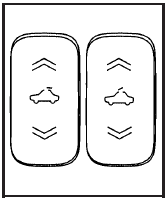
If your vehicle has a power sunroof, the switches are located on the headliner.
To express-open the sunroof press the rear of the driver’s side switch to the second detent position, and release.
To stop the sunroof from express opening, press the switch again. The sunroof has a comfort stop feature which stops the sunroof from opening to the full-open position. From the comfort stop position, press the rear of the driver’s side switch a second time to open the sunroof to the full-open position. If the sunshade is in the closed position, it will open with the sunroof, or it can be opened manually.
To close the sunroof, press the front of the driver side switch to the second detent position, and release.
To vent the sunroof press and hold the back of the passenger side switch until the vent reaches the desired position. Press the front of the passenger side switch to close the sunroof.
If an object is in the path of the sunroof while it is closing, the anti-pinch feature will detect the object and stop the sunroof from closing at the point of the obstruction. The sunroof will then return to the full-open or vent position.
Do not leave the sunroof open for long periods of time.
Excessive debris may collect in the tracks and possibly damage the sunroof operation, or plug the water draining system.
See also:
Remote Keyless Entry (RKE)
System Operation
The Remote Keyless Entry (RKE) transmitter functions
work up to 60 m (195 feet) away from the vehicle.
There are other conditions which can affect the
performance of the transmitter. See Remote K ...
Heated Mirrors
For vehicles with heated mirrors:
(Rear Window Defogger):
Press to heat the mirrors.
See “Rear Window Defogger” under
Automatic Climate Control System for more information. ...
Convex Mirrors
WARNING
A convex mirror can make things, like other vehicles, look farther away than they really are. If you cut too sharply into the right lane, you could hit a vehicle on the right. Check the in ...