


How the System Works
URPA comes on automatically when the shift lever is moved into R (Reverse). The rear display briefly illuminates to indicate the system is working.
URPA operates only at speeds less than 8 km/h (5 mph). If the vehicle is above this speed, the red light on the rear display will flash.
To be detected, objects must be at least 25 cm (10 in) off the ground and below trunk level. Objects must also be within 2.5 m (8 ft) from the rear bumper. This distance may be less during warmer or humid weather.
A single beep will sound the first time an object is detected between 1 m (40 in) and 2.5 m (8 ft) away.
Beeping will occur continuously when the vehicle is at 0.6 m (23 in) or closer to an object.
The following describes what will occur with the URPA display as the vehicle gets closer to a detected object:
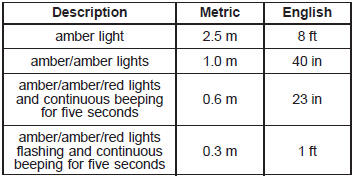
The system can be disabled through the Driver Information Center (DIC). See “Park Assist” under DIC Operation and Displays for more information.
See also:
Steering Wheel Controls
For vehicles with audio steering wheel controls, some audio controls can be adjusted
at the steering wheel.
: Press to interact with the available
Bluetooth, OnStar, or navigation system.
: P ...
Starting the Engine
Move the shift lever to P (Park) or N (Neutral).
The engine will not start in any other position.
To restart the engine when the vehicle is already
moving, use N (Neutral) only.
Notice: Do not tr ...
Servicing Your Airbag-Equipped Vehicle
Airbags affect how your vehicle should be
serviced. There are parts of the airbag system
in several places around your vehicle. You do not
want the system to inflate while someone is
working on yo ...