


Battery Replacement
Replace the battery if the REPLACE BATTERY IN REMOTE KEY message appears in the DIC. See “REPLACE BATTERY IN REMOTE KEY” under DIC Warnings and Messages for additional information.
Notice: When replacing the battery, do not touch any of the circuitry on the transmitter. Static from your body could damage the transmitter.
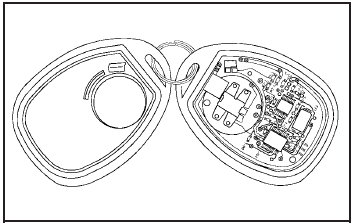
To replace the battery:
1. Separate the transmitter with a flat, thin object inserted into the notch on the side.
2. Remove the old battery. Do not use a metal object.
3. Insert the new battery, positive side facing down.
Replace with a CR2032 or equivalent battery.
4. Snap the transmitter back together.
See also:
Ending a Call
Press to end a call. ...
RKE without Remote Start Shown
RKE without Remote Start Shown
(Lock): Press to lock all doors.
The turn signal indicators may flash
and/or the horn may sound to
indicate locking, see “Locking
Feedback” under Vehicle ...
Maintenance Requirements
Notice: Maintenance intervals, checks,
inspections, replacement parts, and
recommended fluids and lubricants as
prescribed in this manual are necessary to
keep your vehicle in good working conditi ...