


Steering Wheel Controls
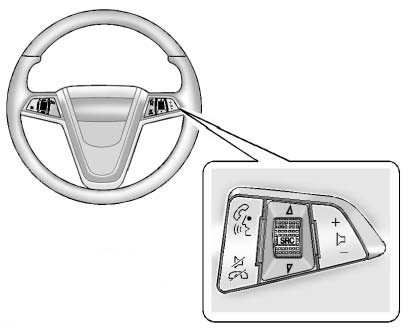
For vehicles with audio steering wheel controls, some audio controls can be adjusted at the steering wheel.
 (Push to Talk): For vehicles with a Bluetooth, OnStar, or navigation system, press to interact with those systems. See Bluetooth (Overview) or Bluetooth (Infotainment Controls) or Bluetooth (Voice Recognition) , the OnStar Owner's Guide, or the separate navigation manual for more information.
 (Mute/End Call): Press to silence the vehicle speakers only.
Press again to turn the sound on. For vehicles with OnStar or Bluetooth systems, press to reject an incoming call, or end a current call.
 (Rotary Control): Turn to select an audio source.
Press  to select the next or previous favorite radio station, CD, or MP3 track.
 (Volume): Press + to increase the volume. Press − to decrease the volume.
See also:
Tire Pressure Monitor
This vehicle may have a Tire Pressure Monitor System (TPMS).
The TPMS warning light alerts you to a significant loss in pressure of one of
the vehicle's tires. If the warning light comes on, ...
When the Light Is On Steady
This indicates that one or more of
the tires are significantly
underinflated.
A Driver Information Center (DIC)
tire pressure message may also
display. See Vehicle Messages for more informati ...
Driving on Snow or Ice
Drive carefully when there is snow or ice between the tires and the road, creating less traction or grip.
Wet ice can occur at about 0°C (32°F) when freezing rain begins to fall, resulting in even ...