


Home Page Features
Various functions are disabled when the vehicle is moving.
Press the Now Playing screen button to display the active source page. The sources available are AM, FM, XM (if equipped), CD, USB/iPod, and AUX.
See AM-FM Radio , Satellite Radio , and Auxiliary Devices .
Press the Phone screen button to display the Phone main page. See Bluetooth (Infotainment Controls) or Bluetooth (Overview) or Bluetooth (Voice Recognition) .
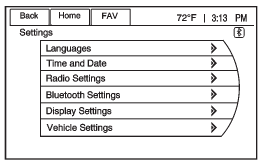
Press the Config screen button to display the Config main page. From this display, you can adjust features such as time and date, radio, Bluetooth, vehicle, and display.
Press the Tone screen button to display the Tone main page. Adjust the tone and speakers by pressing the screen buttons to change the levels of sound for treble, midrange, bass, fade, and balance. See AM-FM Radio .
Press the FM screen button to display the FM main page and play the current or last tuned FM station. See AM-FM Radio .
Press the AM screen button to display the AM main page and play the current or last tuned AM station. See AM-FM Radio .
Press the XM screen button (if equipped) to display the XM main page and play the current or last tuned XM channel. See AM-FM Radio and Satellite Radio .
Press the CD screen button to display the CD main page and play the current or last CD track selected. See CD Player .
Press the USB screen button to display the USB main page and play the current or last track selected. See Auxiliary Devices . Press the AUX screen button to access any connected auxiliary device. See Auxiliary Devices .
See also:
Driving in Rain and on Wet Roads
Rain and wet roads can mean driving trouble.
On a wet road, you cannot stop, accelerate, or turn
as well because your tire-to-road traction is not
as good as on dry roads. And, if your tires do ...
Delayed Locking
When locking the doors with the
power lock switch and a door is
open, the doors will lock
five seconds after the last door is
closed. You will hear three chimes
to signal that the delayed lo ...
Ignition Positions
Use the key to turn the ignition switch to four
different positions.
A (LOCK): This position locks the ignition and
transmission. It is a theft-deterrent feature. You will
only be able to remo ...