


Lumbar Adjustment
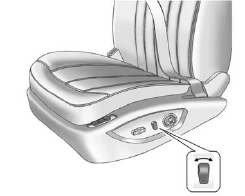
Lumbar Adjustment
To adjust the lumbar support, if available:
• Press and hold the front or rear of the control to increase or decrease lumbar support.
• Press and hold the top or bottom of the control to raise or lower lumbar support.
See Lumbar Adjustment.
See also:
Engine Oil Pressure Light
WARNING
Do not keep driving if the oil pressure is low. The engine can become so hot that it catches fire.
Someone could be burned. Check the oil as soon as possible and have the vehicle serviced ...
Underbody Maintenance
Chemicals used for ice and snow removal and dust control can collect on the underbody. If these are not removed, corrosion and rust can develop on the underbody parts such as fuel lines, frame, floor ...
Increasing Speed While UsingCruise Control
There are two ways to go to a higher speed:
• Use the accelerator pedal to get to the higher
speed. Press the button at the end of the
lever, then release the button and the
accelerator pedal. ...