


Compass
Compass Operation
There is a compass display in the upper right corner of the mirror.
Compass Calibration
Press and hold  to activate the
compass calibration
mode. CAL displays in the compass window on the
mirror.
to activate the
compass calibration
mode. CAL displays in the compass window on the
mirror.
If after a few seconds the display does not show a compass direction, (N for North for example), there may be a strong magnetic field interfering with the compass.
Interference can be caused by a magnetic antenna mount, note pad holder, or similar object. If CAL displays in the compass window, the compass may need to be reset or calibrated.
The compass can be calibrated by driving the vehicle in circles at 5 mph (8 km/h) or less until the display reads a direction.
Compass Variance
The compass is set to zone eight. If you do not live in zone eight or drive out of the area, the compass variance needs to be changed to the appropriate zone.
To adjust for compass variance:
1. Find your current location and variance zone number on the following zone map.
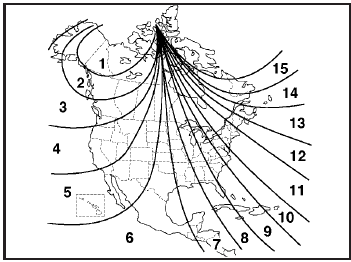
2. Press and hold until the
zone number displays.
The number shown is the current zone number.
3. Once the zone number displays, press
repeatedly
until the correct zone number displays. Stop pressing
the button and the mirror returns to normal operation.
If CAL appears in the compass window, the compass may need calibration. See “Compass Calibration” listed previously.
See also:
Roadside Assistance Program
For U.S. purchased vehicles, call 1-800-252-1112;
(Text Telephone (TTY): 1-888-889-2438).
For Canadian purchased vehicles, call 1-800-268-6800.
Service is available 24 hours a day, 365 days a year ...
Driving on Snow or Ice
Most of the time, those places where the tires
meet the road probably have good traction.
However, if there is snow or ice between the tires
and the road, you can have a very slippery
situation. ...
Battery Replacement
Replace the battery if the REPLACE BATTERY IN REMOTE KEY message displays in
the DIC. See Key and Lock Messages .
The battery is not rechargeable. To replace the battery:
1. Push the button on the ...