


Power Door Locks
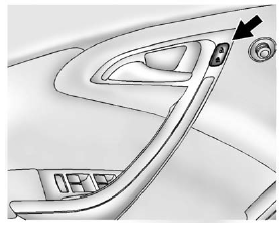
 (Unlock): Press to unlock the doors.
 (Lock): Press to lock the doors.
See “Power Door Locks” in Vehicle Personalization .
(Lock): Press to lock the doors.
See “Power Door Locks” in Vehicle Personalization .
See also:
Roadside Assistance Program (Mexico)
As a new owner, your vehicle is
automatically enrolled in the
Roadside Assistance program. The
services are available at no cost
under the terms and conditions of
the program. The Roadside
...
DIC Buttons
The buttons are the trip/fuel, vehicle information,
customization, and set/reset buttons. The button
functions are detailed in the following pages.
(Trip/Fuel): Press this button
to display ...
Additional Factors Affecting System
Operation
Safety belts help keep the passenger in position on the
seat during vehicle maneuvers and braking, which
helps the passenger sensing system maintain the
passenger airbag status. See “Safety Be ...