


Setting a Value
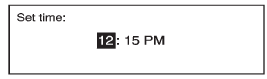
1. Turn the Menu knob to change the current value of the setting.
2. Press SELECT to confirm the setting.
See also:
Programming the Power
Windows
If the battery on the vehicle has
been recharged, disconnected, or is
not working, you will need to
reprogram each front power window
for the express-up feature to work.
Before reprogramming, ...
Connecting and Controlling a PlaysForSure Device (PFD) or Zune
Connecting a PFD or Zune
Connect the PFD or Zune to the USB port.
Searching for a Track
Tracks can be searched for by:
Playlists
Artists
Albums
Song Titles
Podcasts
Genres
To searc ...
Delayed Entry Lighting
The interior lamps will turn on if you open the door when
it is dark enough outside. When you close the door with
the ignition off, the interior lamps will stay on for up to
25 seconds or until ...