


Front Storage
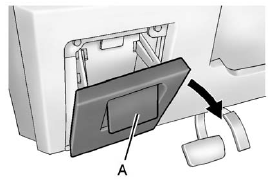
Front Storage
Pull up on the handle (A) and pull the cover down to open.
See also:
Cooling System
The cooling system allows the engine to maintain the correct working temperature.
When it is safe to lift the hood:
2.0 L L4 Engine
A. Electric Engine Cooling Fans
B. Coolant Surge Tank and Pr ...
SBZA Detection Zones
The SBZA sensor covers a zone of
approximately one lane over from
both sides of the vehicle,
or 3.5m(11 ft). This zone starts at
each side mirror and goes back
approximately 5.0 m(16 ft). Th ...
Trip 1 and Trip 2
This display shows the current
distance traveled, in either
kilometers (km) or miles (mi), since
the last reset for the trip odometer.
The trip odometer can be reset to
zero by pressing SET/C ...