


How to Wear Safety Belts Properly
This section is only for people of adult size.
There are special things to know about safety belts and children. And there are different rules for smaller children and infants. If a child will be riding in the vehicle, see Older Children or Infants and Young Children.
Follow those rules for everyone's protection.
It is very important for all occupants to buckle up. Statistics show that unbelted people are hurt more often in crashes than those who are wearing safety belts.
There are important things to know about wearing a safety belt properly.
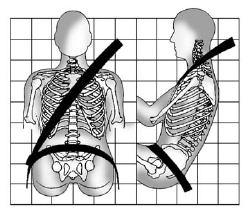
• Sit up straight and always keep your feet on the floor in front of you.
• Always use the correct buckle for your seating position.
• Wear the lap part of the belt low and snug on the hips, just touching the thighs. In a crash, this applies force to the strong pelvic bones and you would be less likely to slide under the lap belt. If you slid under it, the belt would apply force on your abdomen. This could cause serious or even fatal injuries.
• Wear the shoulder belt over the shoulder and across the chest.
These parts of the body are best able to take belt restraining forces. The shoulder belt locks if there is a sudden stop or crash.
WARNING!
You can be seriously injured,
or even killed, by not wearing
your safety belt properly.
• Never allow the lap or
shoulder belt to become
loose or twisted.
• Never wear the shoulder belt
under both arms or behind
your back.
• Never route the lap or
shoulder belt over an
armrest.
See also:
The Comfort Story
The CX is more comfortable than the higher trim levels I've driven, for one
reason: the cloth seats. It's not the upholstery itself; it's the seat design.
Both I and another editor found the leath ...
Setting the Clock (Radio with CD)
To set the time:
1. Press the CONFIG button and select Time Settings or press
.
2. Select Set Time.
3. Turn the TUNE/MENU knob to adjust the highlighted number.
4. Press TUNE/MENU to select the n ...
Audio Source
VOL/ (Volume/Power):
1. Press to turn the radio on or off.
2. Turn to increase or decrease the
volume of the active source
(i.e., current audio source, active
navigation voice guidance,
or ...