


Front Seat
Front Seat
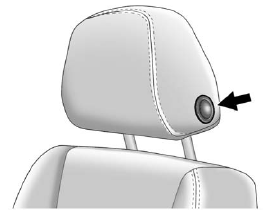
To raise or lower the head restraint, press the release button located on the side of the head restraint and pull up or push the head restraint down and release the button.
Pull and push on the head restraint after the button is released to make sure that it is locked in place.
The front head restraints are not designed to be removed.
See also:
Safety Belt Extender
If the vehicle’s safety belt will fasten around you, you
should use it.
But if a safety belt is not long enough, your
dealer/retailer will order you an extender. When you go
in to order it, t ...
Dome Lamps
The dome lamp controls are located in the overhead console.
: Press to turn the lamps off, even
when a door is open.
: Press to turn the lamps on automatically
when a door is opened.
: Press ...
What to Do with Used Oil
Used engine oil contains certain
elements that can be unhealthy for
your skin and could even cause
cancer. Do not let used oil stay on
your skin for very long. Clean your
skin and nails with ...