


Safety Locks
Safety Locks
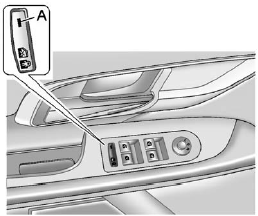
Press o  to activate the safety
locks on the rear doors. The
LED (A) comes on when activated.
to activate the safety
locks on the rear doors. The
LED (A) comes on when activated.
The rear door power windows are also disabled.
Press o again to deactivate the
lockout switch.
If the light flashes, the feature may not be working properly.
See also:
Drunk Driving
Death and injury associated with drinking and driving is a global tragedy.
WARNING
Drinking and then driving is very dangerous. Your reflexes, perceptions, attentiveness,
and judgment can be aff ...
Overhead Console
Your vehicle may have this feature. The overhead
console may include reading lamps, a Universal
Home Remote and a sunroof switch. ...
Driving on Snow or Ice
Most of the time, those places where the tires
meet the road probably have good traction.
However, if there is snow or ice between the tires
and the road, you can have a very slippery
situation. ...