


Manual Seats
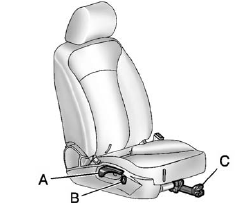
Manual Seats
A. Seatback Recline Lever
B. Height Adjustment Switch
C. Seat Position Handle
To adjust the seat position:
1. Pull the handle (C) under the front of the seat cushion.
2. Slide the seat to the desired position and release the handle (C).
3. Try to move the seat back and forth to be sure it is locked in place.
Press and hold the top or bottom of the switch (B) to raise or lower the seat. Release the switch (B) when the desired height is reached.
To raise or recline the seatback, use the lever (A) on the outboard side of the seat.
See Seat Adjustment and Reclining Seatbacks for more information.
See also:
Passenger Airbag Status Indicator
The vehicle has a passenger
sensing system. See Passenger
Sensing System for
important safety information. The
instrument panel has a passenger
airbag status indicator.
When the vehicle i ...
Windshield Washer
WARNING:
In freezing weather, do not use your washer until
the windshield is warmed. Otherwise the washer
fluid can form ice on the windshield, blocking your
vision.
(Washer Fluid): Press and ...
Sheet Metal Damage
If the vehicle is damaged and requires sheet metal repair or replacement, make sure the body repair shop applies anti-corrosion material to parts repaired or replaced to restore corrosion protection.
...