


Certification Label
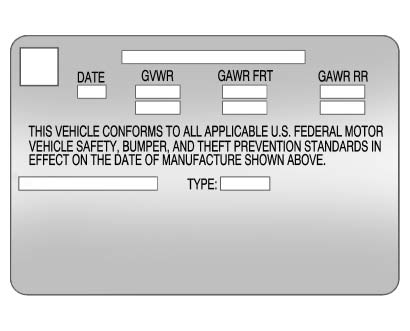 Label Example
A vehicle-specific Certification label is attached to the driver side center pillar (B-pillar).
The label tells the gross weight capacity of the vehicle, called the Gross Vehicle Weight Rating (GVWR). The GVWR includes the weight of the vehicle, all occupants, fuel, and cargo.
Never exceed the GVWR for the vehicle, or the Gross Axle Weight Rating (GAWR) for either the front or rear axle.
And, if there is a heavy load, it should be spread out.
See “Steps for Determining Correct Load Limit” earlier in this section.
 WARNING
Do not load the vehicle any heavier than the Gross Vehicle Weight Rating (GVWR), or either the maximum front or rear Gross Axle Weight Rating (GAWR).
This can cause systems to break and change the way the vehicle handles. This could cause loss of control and a crash. Overloading can also shorten the life of the vehicle.
If you put things inside the vehicle—like suitcases, tools, packages, or anything else—they will go as fast as the vehicle goes. If you have to stop or turn quickly, or if there is a crash, they will keep going.
WARNING
Things inside the vehicle can strike and injure people in a sudden stop or turn, or in a crash.
Try to spread the weight evenly.
Never stack heavier things, like suitcases, inside the vehicle so that some of them are above the tops of the seats.
► Do not leave an unsecured child restraint in the vehicle. ► Secure loose items in the vehicle. ► Do not leave a seat folded down unless needed.See also:
Pulling A Trailer
Here are some important points:
• There are many different laws, including speed limit
restrictions, having to do with trailering. Make sure
the rig will be legal, not only where you live but
...
Tachometer
The tachometer displays the engine speed in revolutions
per minute (rpm). ...
Accessory Power Outlet(s)
The accessory power outlets can be used to plug in
electrical equipment, such as a cellular telephone.
The vehicle may have up to three power outlets
depending on the type of front seat installed ...