


Tire and Loading Information Label
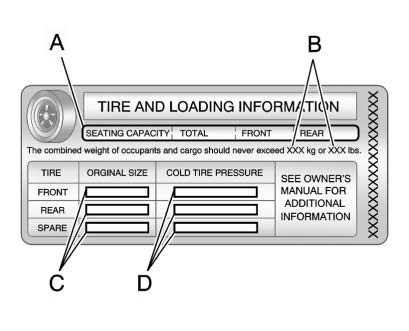
A vehicle-specific Tire and Loading Information label is attached to the vehicle's center pillar (B-pillar).
With the driver door open, you will find the label attached below the door lock post.
The Tire and Loading Information label shows the number of occupant seating positions (A), and the maximum vehicle capacity weight (B) in kilograms and pounds.
The Tire and Loading Information label also shows the tire size of the original equipment tires (C) and the recommended cold tire inflation pressures (D). For more information on tires and inflation see Tires and Tire Pressure .
There is also important loading information on the Certification label. It tells you the Gross Vehicle Weight Rating (GVWR) and the Gross Axle Weight Rating (GAWR) for the front and rear axle. See “Certification Label” later in this section.
See also:
Saving MEM Tracks as
Favorites
Favorites can be saved by pressing
and holding one of the 1 to
6 buttons. Favorites can be stored
according to the following list:
Playlist: Adds the currently playing
track to the playlist s ...
Hitches
Use the correct hitch equipment. See your dealer or a hitch dealer for assistance.
. The rear bumper on the vehicle is not intended for hitches. Do not attach rental
hitches or other bumper-type hi ...
Buying New Tires
GM has developed and matched specific tires for
your vehicle. The original equipment tires
installed on your vehicle, when it was new, were
designed to meet General Motors Tire
Performance Cri ...