


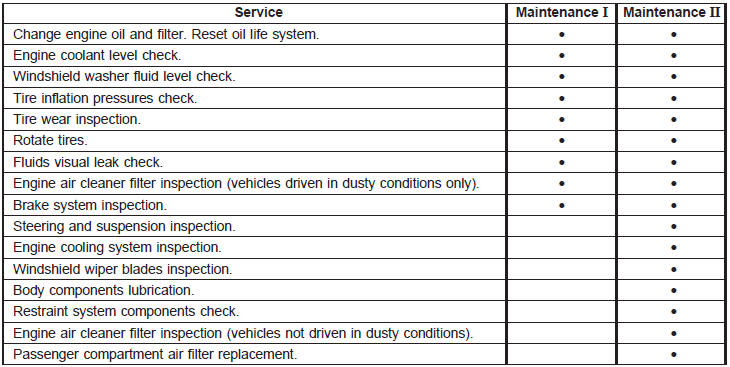
Scheduled Maintenance
Buick Lucerne / Buick Lucerne Owners Manual / Maintenance Schedule / Scheduled Maintenance / Scheduled Maintenance
See also:
Backing Up
Hold the bottom of the steering wheel with one hand. Then, to
move the trailer to the left, move that hand to the left. To move the trailer to
the right, move your hand to the right. Always back u ...
Engine Exhaust
WARNING:
Engine exhaust contains Carbon Monoxide (CO)
which cannot be seen or smelled. Exposure to CO
can cause unconsciousness and even death.
Exhaust may enter the vehicle if:
• The vehicle ...
Fuel Gauge
Metric
English
When the ignition is on, the fuel
gauge indicates about how much
fuel is left in the tank.
An arrow on the fuel gauge
indicates the side of the vehicle the
fuel door is o ...