


Traction Control System (TCS) Warning Light
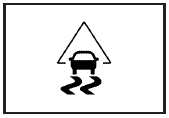
For vehicles with a Traction Control System (TCS) and StabiliTrak® warning light, this light comes on briefly when the engine is started.
If it does not, have the vehicle serviced by your dealer/retailer. If the system is working normally the indicator light then goes off.
When the system is active, the light flashes while the system is limiting wheel spin or assisting with controlling the vehicle.
If it stays on or comes on while driving a SERVICE TRACTION CONTROL message appears in the Driver Information Center (DIC). This indicates that there could be a problem with the traction control system and the vehicle may need service. When this warning light is on and the SERVICE TRACTION CONTROL message appears on the DIC, the system does not limit wheel spin.
If the traction control system is manually turned off, this light comes on and the TRACTION CONTROL OFF message appears on the DIC.
See Traction Control System (TCS) and DIC Warnings and Messages for more information.
See also:
Tire Terminology and Definitions
Air Pressure: The amount of
air inside the tire pressing
outward on each square inch of
the tire. Air pressure is
expressed in kPa (kilopascal)
or psi (pounds per square inch).
Accessory We ...
Storing a Flat or Spare Tire and
Tools
WARNING:
Storing a jack, a tire, or other equipment in the
passenger compartment of the vehicle could
cause injury. In a sudden stop or collision, loose
equipment could strike someone. Store al ...
Using the Digit Dial Command
1. Press and hold for two
seconds. The system
responds with “Ready” followed by a tone.
2. Say “Digit Dial”. The system responds with “Digit
dial using <phone name>, please say ...