


Heated Seats
Your vehicle may have heated front seats. To operate the heated seats, the ignition must be on.
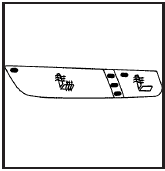
Driver’s Side Buttons shown
The buttons are located on the front doors.
 (Heated Seat Cushion and
Seatback): Press this
button to turn on the heated seat cushion and seatback.
(Heated Seat Cushion and
Seatback): Press this
button to turn on the heated seat cushion and seatback.
 (Heated Seatback): Press this
button to turn on
the heated seatback.
(Heated Seatback): Press this
button to turn on
the heated seatback.
When either button is pressed, an indicator light on that button shows that the feature is on.
There are three temperature settings for each feature.
A column of three lights next to the buttons will display which setting the feature is in: high, medium or low.
Three lights indicate the highest setting, two lights indicate medium and one light indicates the lowest setting.
When you press a button, the feature will turn on at the highest setting. Each time you press the button, the feature will decrease one temperature setting.
To turn the feature off, keep pressing the button until the display lights turn off.
If your vehicle has remote vehicle start and is started using the RKE transmitter, the front heated seats will be turned on to the high setting if it is cold outside. See “Remote Vehicle Start” under Remote Keyless Entry (RKE) System Operation. When the key is inserted into the ignition and the ignition is turned on, the heated seat feature will turn off. To turn the heated seat feature back on, press the desired button.
See also:
California Fuel
If the vehicle is certified to meet California Emissions
Standards, it is designed to operate on fuels that
meet California specifications. See the underhood
emission control label. If this fuel ...
Trip Odometer
A trip odometer show how far the vehicle has been
driven since the odometer was last set to zero.
See Driver Information Center (DIC) for
information on resetting the trip odometer. ...
Connecting and Controlling a USB Drive (Radio with CD and Radio with
CD/DVD/MEM)
The infotainment system can only
play back .mp3 and .wma files from
a USB drive.
Only the first 2,500 songs are
recognized on the device.
When a device is not supported, the
message “No su ...