


Lane Departure Warning (LDW)
For vehicles with LDW, it is intended to help avoid lane change collisions. It provides a warning if the vehicle is crossing a lane without using a turn signal. LDW uses a camera to detect the lane markings. It only operates at speeds of 56 km (35 mph) or greater.
The warning symbol  , located in the
instrument panel
cluster, appears green if a lane marking is detected.
, located in the
instrument panel
cluster, appears green if a lane marking is detected.
It changes to amber, flashes, and sounds three chimes if the vehicle crosses a detected land marking and the turn signal is not on.
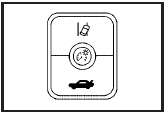
To turn LDW on and off, press the LDW button, located by the exterior headlamp control.
See Lane Departure Warning (LDW) for more information.
See also:
Using the Tire Sealant and
Compressor Kit to Temporarily
Seal and Inflate a
Punctured Tire
Follow the directions closely for
correct sealant usage.
When using the tire sealant and
compressor kit during cold
temperatures, warm the kit in a
heated environment for five minutes.
Thi ...
Filling the Tank
CAUTION:
Fuel vapor burns violently and a fuel fire
can cause bad injuries. To help avoid
injuries to you and others, read and follow
all the instructions on the pump island.
Turn off your engi ...
Airbag System
The vehicle has the following
airbags:
• A frontal airbag for the driver.
• A frontal airbag for the front
outboard passenger.
• A seat-mounted side impact
airbag for the driver.
• A ...