


Radio(s)
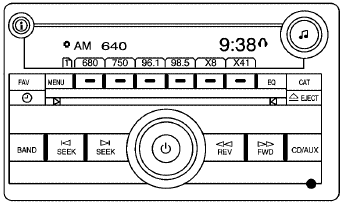
Radio with CD (MP3)
 : Press to turn the system on
and off. Turn to
increase or decrease the volume.
: Press to turn the system on
and off. Turn to
increase or decrease the volume.
BAND: Press to choose between FM, AM, or XM™, if equipped.
 : Select radio stations.
 : Seek or scan stations.
 (XM™ Satellite Radio Service, MP3,
and RDS
Features): Press this button to display additional text
information related to the current FM-RDS or XM station,
or MP3 song. When information is not available, No
Info displays.
(XM™ Satellite Radio Service, MP3,
and RDS
Features): Press this button to display additional text
information related to the current FM-RDS or XM station,
or MP3 song. When information is not available, No
Info displays.
For more information about these and other radio features, see Audio System(s).
See also:
Driving for Better Fuel Economy
Driving habits can affect fuel mileage. Here are some
driving tips to get the best fuel economy possible.
• Avoid fast starts and accelerate smoothly.
• Brake gradually and avoid abrupt stops. ...
Making a Call
Calls can be made using the
following commands.
Dial or Call: The dial or call
command can be used
interchangeably to dial a phone
number or a stored name tag.
Digit Dial: This command allow ...
Steering
Power Steering
If you lose power steering assist because the
engine stops or the system is not functioning,
you can steer but it will take much more effort.
Steering Tips
It is important to take ...