


Instrument Panel
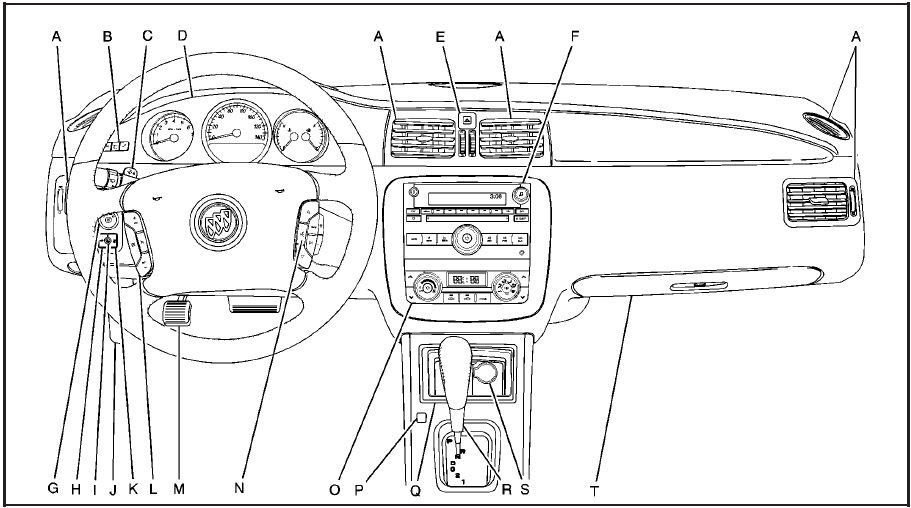
Instrument Panel
A. Outlet Adjustment.
B. DIC Operation and Displays (If Equipped).
C. Turn Signal/Multifunction Lever.
D. Instrument Panel Cluster.
E. Hazard Warning Flashers.
F. Audio System(s).
G. Exterior Lamps.
H. Trunk Release. See Trunk.
I. Instrument Panel Brightness.
J. Hood Release.
K. Lane Departure Warning (LDW) (If Equipped).
L. Cruise Control. Heated Steering Wheel (If
Equipped).
M. Parking Brake.
N. Audio Steering Wheel Controls (If Equipped).
O. Climate Control System or Dual Automatic Climate Control System .
P. Traction Control System (TCS) and StabiliTrak® System.
Q. Front Storage Area.
R. Shift Lever. See Automatic Transmission Operation.
S. Accessory Power Outlet(s).
T. Glove Box.
See also:
Engine Oil Additives/Engine Oil Flushes
Do not add anything to the oil. The recommended oils with the dexos specification
and displaying the dexos certification mark are all that is needed for good performance
and engine protection.
En ...
Lap-Shoulder Belt
All seating positions in the vehicle have a lap-shoulder belt.
The following instructions explain how to wear a lap-shoulder belt properly.
1. Adjust the seat, if the seat is adjustable, so you can ...
How to Wear Safety Belts Properly
This section is only for people of adult size.
Be aware that there are special things to know about safety belts and children. And there are different rules for smaller children and infants. If a chi ...