


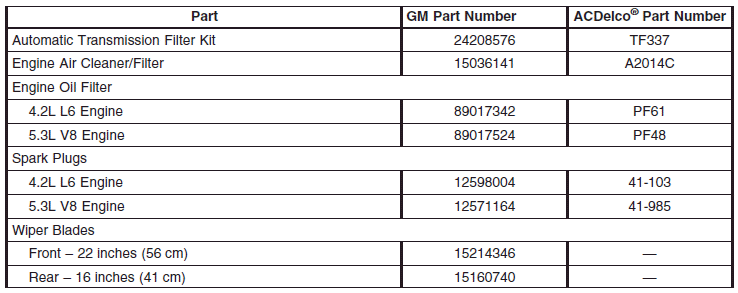
Normal Maintenance Replacement Parts
Replacement parts identified below by name, part number, or specification can be obtained from your dealer.
See also:
Top Tether Anchor
A top tether (A, C) anchors the top of the child restraint to the vehicle.
A top tether anchor is built into the vehicle. The top tether attachment (B) on the child restraint connects to the top te ...
Automatic Transmission
The automatic transmission has a shift lever located on the console between the seats.
The mode or selected gear is shown in the instrument cluster
P (Park): This position locks the drive wheels ...
Where Are the Airbags?
The driver’s frontal airbag is in the middle of the
steering wheel.
The right front passenger’s frontal airbag is in the
instrument panel on the passenger’s side.
If your vehicle has a ...