


Securing a Child Restraint in a Rear Outside Seat Position
If your child restraint has the LATCH system, see Lower Anchors and Tethers for Children (LATCH) on page 54.
If your child restraint does not have the LATCH system, you will be using the lap-shoulder belt to secure the child restraint in this position.
Be sure to follow the instructions that came with the child restraint. Secure the child in the child restraint when and as the instructions say.
1. Put the child restraint on the seat.
2. Pick up the latch plate, and run the lap and
shoulder portions of the vehicle’s safety belt
through or around the restraint. The child
restraint instructions will show you how.
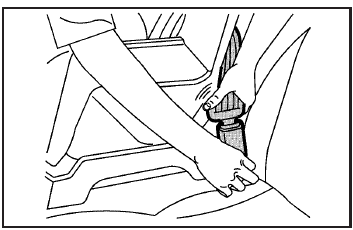
3. Buckle the belt. Make sure the release button is positioned so you would be able to unbuckle the safety belt quickly if you ever had to.
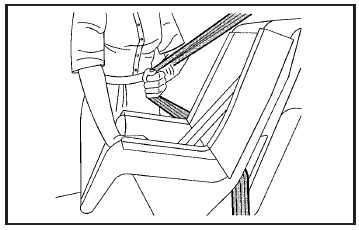
4. Pull the rest of the shoulder belt all the way out of the retractor to set the lock.
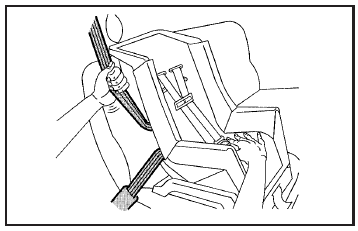
5. To tighten the belt, push down on the child restraint, pull the shoulder portion of the belt to tighten the lap portion of the belt, and feed the shoulder belt back into the retractor.
If you are using a forward-facing child restraint, you may find it helpful to use your knee to push down on the child restraint as you tighten the belt.
6. If your child restraint manufacturer recommends using a top tether, attach and tighten the top tether to the top tether anchor.
Refer to the instructions that came with the child restraint and to Lower Anchors and Tethers for Children (LATCH) on page 54.
7. Push and pull the child restraint in different directions to be sure it is secure.
To remove the child restraint, if the top tether is attached to the top tether anchor, disconnect it. Unbuckle the vehicle’s safety belt and let it go back all the way. The safety belt will move freely again and be ready to work for an adult or larger child passenger.
See also:
Antilock Brake System (ABS) Warning Light
This light comes on briefly when the
engine is started.
If the light does not come on, have it
fixed so it will be ready to warn if
there is a problem.
If the ABS light stays on, turn the
...
Tire Rotation
Tires should be rotated every 12 000 km (7,500 mi). See Maintenance Schedule
.
Tires are rotated to achieve a uniform wear for all tires. The first rotation
is the most important.
Any time unusu ...
Customer Assistance Offices
Buick encourages customers to call the toll-free number
for assistance. However, if a customer wishes to
write or e-mail Buick, the letter should be addressed to:
United States — Customer Assis ...