


Maintenance Replacement Parts
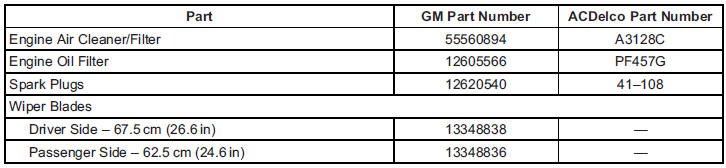
Replacement parts identified below by name, part number, or specification can be obtained from your dealer.
See also:
Driving on Wet Roads
Rain and wet roads can reduce
vehicle traction and affect your
ability to stop and accelerate.
Always drive slower in these types
of driving conditions and avoid
driving through large puddles ...
Freeway Driving
Mile for mile, freeways — also called thruways,
parkways, expressways, turnpikes, or
superhighways — are the safest of all roads.
But they have their own special rules.
The most importan ...
Windshield Washer Fluid
What to Use
When you need windshield washer fluid, be sure
to read the manufacturer’s instructions before
use. If you will be operating your vehicle in an area
where the temperature may fall bel ...