


Manual Mode
Driver Shift Control (DSC)
 Notice: Driving with the engine at a high rpm without upshifting while using
Driver Shift Control (DSC), could damage the vehicle. Always upshift when necessary
while using DSC.
Notice: Driving with the engine at a high rpm without upshifting while using
Driver Shift Control (DSC), could damage the vehicle. Always upshift when necessary
while using DSC.
Driver Shift Control (DSC) allows you to shift an automatic transmission similar to a manual transmission. To use the DSC feature:
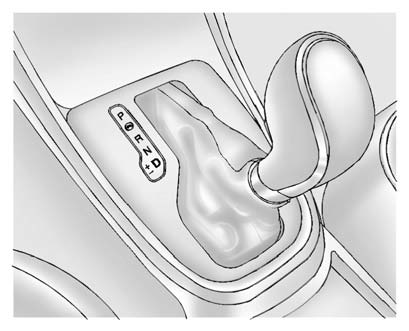
1. Move the shift lever from D (Drive) to the left into the (+) or (−) manual position.
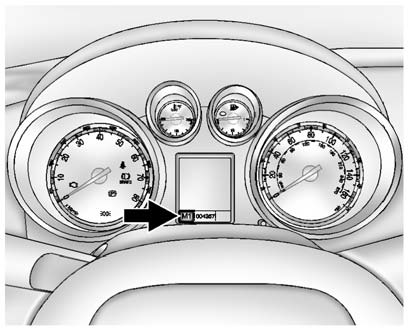
2. Press the shift lever forward (+) to upshift or rearward (−) to downshift. An M and the current gear will be displayed in the DIC.
While using the DSC feature, the vehicle will have firmer, quicker shifting. You can use this for sport driving or when climbing or descending hills, to stay in gear longer, or to downshift for more power or engine braking.
The transmission will only allow you to shift into gears appropriate for the vehicle speed and engine revolutions per minute (rpm).
The transmission will not automatically shift to the next lower gear if the engine rpm is too high, nor to the next higher gear when the maximum engine rpm is reached.
If shifting is prevented for any reason, the currently selected gear will flash multiple times, indicating that the transmission has not shifted gears.
While in the DSC mode, the transmission will automatically downshift when the vehicle comes to a stop. This will allow for more power during take-off.
When accelerating the vehicle from a stop in snowy and icy conditions, you may want to shift into second gear. A higher gear allows the vehicle to gain more traction on slippery surfaces.
See also:
Front Fog Lamp Light
For vehicles with fog lamps, this
light comes on when the fog lamps
are on.
The light goes out when the fog
lamps are turned off. See Fog
Lamps for more
information. ...
Shuffle (Radio with CD)
Turn the Menu knob and set Shuffle
Songs (Random) to On or Off, then
press the BACK button to return
the main screen.
On: Plays tracks in the current
folder in random order.
Off: Plays trac ...
Exterior
For 2006, a new front grille and tri-shield emblem are installed. Sculpted
wheel flares and shoulders are meant to enhance the Rainier's appearance.
Clear headlights have offset high/low beam fixt ...