


Sunroof
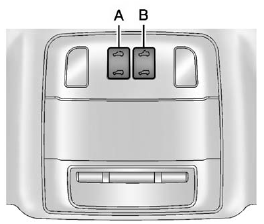
For vehicles with a sunroof, the sunroof only operates when the ignition is in ON/RUN or ACC/ ACCESSORY, or in Retained Accessory Power (RAP). See Retained Accessory Power (RAP) for more information. Open/Close: Press switch (A) to the first detent position.
Express Open/Close: Press switch (A) to the second detent position and release. To stop the movement, press the switch again.
Automatic Tilt/Close: Press the rear of switch (B) to vent the sunroof. Press the front of switch (B) to close the sunroof vent. If an object is in the path of the sunroof while it is closing, the anti-pinch feature will detect the object and stop the sunroof. The sunroof will then return to the full-open or vent position.
The sunroof cannot be opened or closed if the vehicle has an electrical failure.
Safety Function
If the sunroof has any resistance during automatic closing, it will immediately stop and reverse.
To override the safety function, press and hold the front of switch (A) or (B). The sunroof closes without the safety function. To stop the movement, release the switch.
Initializing
After a power failure, the sunroof operation may be limited. Have the system initialized by a dealer technician.
Sunshade
The sunshade is manually operated. Close or open the sunshade by sliding. When the sunroof is opened, the sunshade is always open.
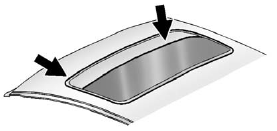
Dirt and debris may collect on the sunroof seal or in the track. This could cause an issue with sunroof operation or noise. It could also plug the water drainage system. Periodically open the sunroof and remove any obstacles or loose debris. Wipe the sunroof seal and roof sealing area using a clean cloth, mild soap, and water. Do not remove grease from the sunroof.
See also:
Key and Lock Messages
REPLACE BATTERY IN REMOTE KEY
This message displays when the battery in the Remote Keyless Entry (RKE) transmitter needs to be replaced. ...
How to Add Automatic Transmission
Fluid
Refer to the Maintenance Schedule to determine what
kind of transmission fluid to use. See Recommended
Fluids and Lubricants.
If the fluid level is low, add only enough of the proper
fluid to b ...
eAssist Vehicles Only
WARNING!
Never try to do your own service
on eAssist components. You can
be injured and the vehicle can be
damaged if you try to do your own
service work. Service and repair
of these eAssis ...