


Programming without a Recognized Transmitter (Keyless Access Vehicles Only)
If there are no currently recognized transmitters available, follow this procedure to program up to five transmitters. This feature is not available in Canada. This procedure will take approximately 30 minutes to complete. The vehicle must be off and all of the transmitters you wish to program must be with you.
1. Insert the vehicle key of the transmitter into the key lock cylinder located on the outside of the driver door and turn the key to the unlock position five times within 10 seconds. The Driver Information Center (DIC) displays REMOTE LEARN PENDING, PLEASE WAIT.
2. Wait for 10 minutes until the DIC displays PRESS ENGINE START BUTTON TO LEARN and then press the ignition. The DIC display will again show REMOTE LEARN PENDING, PLEASE WAIT.
3. Repeat Step 2 two additional times. After the third time all previously known transmitters will no longer work with the vehicle. Remaining transmitters can be relearned during the next steps.
The DIC display should now show READY FOR REMOTE # 1.
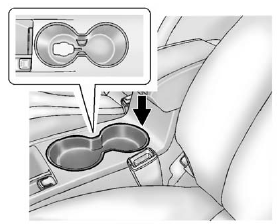
4. Place the new transmitter into the transmitter pocket with the buttons facing up. The transmitter pocket is located inside the center console cupholder. The cupholder liner will need to be removed to access the transmitter pocket. Use your finger or a tool in the notch at the rear of the cupholders to remove the liner. See Cupholders .
5. Press the ignition. When the transmitter is learned, the DIC will show that it is ready to program the next transmitter.
6. Remove the transmitter from the transmitter pocket and press
 .
.
To program additional transmitters, repeat Steps 4 through 6.
When all additional transmitters are programmed, press and hold the ignition for at least 10 seconds to exit programming mode.
See also:
AUTO (Automatic Mode)
1. Turn the fan control to AUTO.
2. Turn the mode control to AUTO.
3. Adjust the temperature to a comfortable setting
between 68°F (21°C) and 78°F (26°C).
Choosing the coldest or warmest temp ...
Instrument Panel Illumination Control
The brightness of the instrument panel lighting and steering wheel controls can be adjusted.
:
Move and hold the thumbwheel up or down to brighten or dim the lights. ...
Replacing LATCH System Parts After a Crash
WARNING!
A crash can damage the LATCH
system in the vehicle. A damaged
LATCH system may not properly
secure the child restraint,
resulting in serious injury or even
death in a crash. To hel ...