


Trunk Release
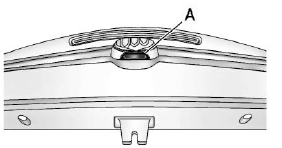
To open the trunk, press the touchpad (A) under the vehicle emblem.
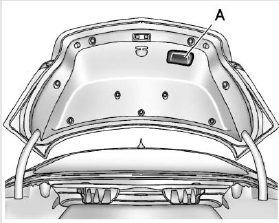
To close the trunk, use the pull cup (A) as an aid.
See also:
Torque Lock
If you are parking on a hill and you do not shift your
transmission into PARK (P) properly, the weight of
the vehicle may put too much force on the parking
pawl in the transmission. You may find it ...
Engine Exhaust
WARNING
Engine exhaust contains carbon monoxide (CO) which cannot be seen or smelled.
Exposure to CO can cause unconsciousness and even death.
Exhaust may enter the vehicle if:
The vehicle i ...
If a Tire Goes Flat
It is unusual for a tire to blow out
while driving, especially if the tires
are maintained properly. See Tires. If air goes out of a
tire, it is much more likely to leak
out slowly. But if the ...