


Remote Keyless Entry (RKE) System
The RKE transmitter will work up to 20m (65 ft) away from the vehicle.
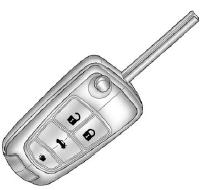
Press the key release button to extend the key blade. The key can be used for the ignition and all locks.
Press  to unlock the driver door
or all doors
to unlock the driver door
or all doors
Press  to lock all doors.
Lock and unlock feedback can be personalized. See Vehicle Personalization .
Press and hold
 to open the trunk.
Press and release
 to locate the vehicle.
Press and hold for at least two seconds to sound the panic alarm.
Press  again
to cancel the panic alarm.
again
to cancel the panic alarm.
See Keys and Remote Keyless Entry (RKE) System Operation .
See also:
Event Data Recorders
This vehicle has an Event Data Recorder (EDR). The main purpose of an EDR is to record, in certain crash or near crash-like situations, such as an airbag deployment or hitting a road obstacle, data th ...
Guidelines
The RVC system has a guideline
overlay that can help the driver align
the vehicle when backing into a
parking spot.
To turn the guidelines on or off:
1. Shift into P (Park).
2. Press the CONF ...
Service Parts Identification Label
This label, in the trunk, has the
following information:
• Vehicle Identification
Number (VIN).
• Model designation.
• Paint information.
• Production options and special
equipment.
...