


Turning a Function On or Off
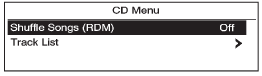
1. Turn the Menu knob to highlight the function.
2. Press SELECT to turn the function on or off.
See also:
Call Waiting
Call waiting must be supported on
the Bluetooth phone and enabled by
the wireless service carrier to work.
Accepting a Call
Turn the Menu knob to “Answer”
and press SELECT to accept
the ...
Customer Satisfaction Procedure (U.S. and Canada)
Your satisfaction and goodwill are
important to your dealer and to
Buick. Normally, any concerns with
the sales transaction or the
operation of the vehicle will be
resolved by your dealer's ...
Power Windows
The power window switches located on the driver door control all four windows.
Each passenger door has a switch that controls only that window.
Press the switch to lower the window. Pull the fron ...