


Submenus
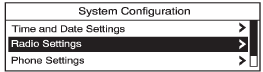
An arrow on the right-hand edge of the menu indicates that it has a submenu with other options.
See also:
Starting the Engine
Place the transmission in the proper gear.
Notice: The engine is designed to work with the electronics in the vehicle. If
you add electrical parts or accessories, you could change the way the engin ...
Conditions in Which Remote Start
Will Not Work
The remote start will not operate if:
• The key is in the ignition (key
access) or the ignition is in any
position other than OFF (keyless
access).
• The transmitter is in the vehicle
(k ...
Programmable Locking Feature
Following are the two locking modes that can be
programmed:
Mode 1: All doors lock when the transmission is
shifted out of PARK (P).
Mode 2: All doors lock when the vehicle speed is
greater t ...