


Selecting a Menu Option
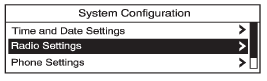
1. Turn the Menu knob to move the highlighted bar.
2. Press SELECT to select the highlighted option.
See also:
Fixed Mast Antenna
The fixed mast antenna can withstand most car
washes without being damaged. If the mast should
ever become slightly bent, straighten it out by
hand. If the mast is badly bent, replace it.
Check ...
Parking Brake
The parking brake pedal
is located to the left of
the regular brake pedal,
near the driver door.
To set the parking brake, hold the regular brake pedal
down, then push the parking brake ped ...
Weight of the Trailer
How heavy can a trailer safely be?
For a vehicle with a V6 engine, it
should never weigh more than
454 kg (1,000 lbs). But even that
can be too heavy.
It depends on how the rig is used.
For e ...