


Manual Reclining Seatbacks
WARNING!
You can lose control of the
vehicle if you try to adjust a
manual driver seat while the
vehicle is moving. The sudden
movement could startle and
confuse you, or make you push a
pedal when you do not want to.
Adjust the driver seat only when
the vehicle is not moving.
WARNING!
If either seatback is not locked, it
could move forward in a sudden
stop or crash. That could cause
injury to the person sitting there.
Always push and pull on the
seatbacks to be sure they are
locked.
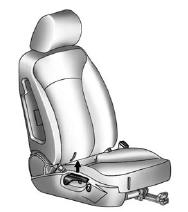
To recline the seatback:
1. Lift the recline lever.
2. Move the seatback to the desired position, and then release the lever to lock the seatback in place.
3. Push and pull on the seatback to make sure it is locked.
To return the seatback to the upright position:
1. Lift the lever fully without applying pressure to the seatback, and the seatback will return to the upright position.
2. Push and pull on the seatback to make sure it is locked.
See also:
Service Manuals
Service Manuals have the diagnosis
and repair information on the
engines, transmission, axle,
suspension, brakes, electrical,
steering, body, etc. ...
Engine Cooling System Messages
A/C OFF DUE TO HIGH ENGINE TEMP
This message displays when the engine coolant becomes hotter than the normal
operating temperature. To avoid added strain on a hot engine, the air conditioning
com ...
Pulling a Trailer
Here are some important points:
. There are many laws, including speed limit restrictions
that apply to trailering. Check for legal requirements with state or provincial
police.
. Do not t ...