


Memory Features
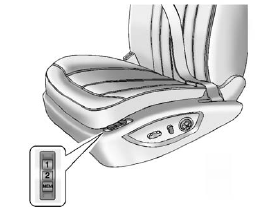
On vehicles with the memory feature, the “1” and “2” buttons on the outboard side of the driver seat are used to manually save and recall the driver seat and outside mirror positions. These manually stored positions are referred to as Button Memory positions.
The vehicle will also automatically save driver seat and outside mirror positions to the current driver Remote Keyless Entry (RKE) transmitter when the ignition is placed in OFF. These automatically stored positions are referred to as RKE Memory positions.
Storing Button Memory Positions
To save positions into Button Memory:
1. Adjust the driver seat, seatback recliner, and both outside mirrors to the desired driving positions.
2. Press and hold MEM (Memory) and “1” at the same time until a beep sounds.
3. Repeat Steps 1 and 2 for a second driver using “2.”.
To recall the manually saved Button Memory positions, press and hold “1” or “2.” The driver seat and outside mirrors move to the positions stored to those buttons when pressed. Releasing “1” or “2” before the stored positions are reached stops the recall.
To automatically recall RKE Memory
positions, unlock the driver door
with the RKE transmitter, and open
the driver door. On vehicles with
Keyless Access, opening the driver
door when an RKE transmitter is
present will activate the RKE
Memory recall. If the driver door is
already open, pressing the RKE
transmitter  button will also
activate the RKE Memory recall.
button will also
activate the RKE Memory recall.
The driver seat and outside mirrors will move to the previously saved RKE Memory positions.
See Memory Seats for more information.
Easy Exit Driver Seat
This feature moves the seat rearward allowing the driver more room to exit the vehicle.
To activate, place the ignition in OFF and open the driver door. If the driver door is already open, placing the ignition in OFF will activate the easy exit driver seat.
This feature is turned on or off using the vehicle personalization menu.
See Vehicle Personalization for more information.
See also:
Engine Coolant Temperature Gauge
Metric
English
This gauge shows the engine coolant temperature.
If the indicator needle moves to the hot side of the gauge toward the shaded area, the engine is too hot.
If the vehicle has been ...
Defogging and Defrosting
Fog on the inside of windows is a result of high
humidity (moisture) condensing on the cool window
glass. This can be minimized if the climate
control system is used properly. You can use
either d ...
Daytime Running Lamps (DRL)
Daytime Running Lamps (DRL) can
make it easier for others to see the
front of your vehicle during the day.
Fully functional daytime running
lamps are required on all vehicles
first sold in Ca ...