


Tire Designations
Tire Size
The following is an example of a typical passenger vehicle tire size.
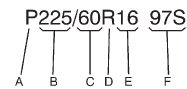
(A) Passenger (P-Metric) Tire: The United States version of a metric tire sizing system.
The letter P as the first character in the tire size means a passenger vehicle tire engineered to standards set by the U.S. Tire and Rim Association.
(B) Tire Width: The three-digit number indicates the tire section width in millimeters from sidewall to sidewall.
(C) Aspect Ratio: A two-digit number that indicates the tire height-to-width measurements.
For example, if the tire size aspect ratio is 60, as shown in item C of the illustration, it would mean that the tire's sidewall is 60 percent as high as it is wide.
(D) Construction Code: A letter code is used to indicate the type of ply construction in the tire. The letter R means radial ply construction; the letter D means diagonal or bias ply construction; and the letter B means belted-bias ply construction.
(E) Rim Diameter: Diameter of the wheel in inches.
(F) Service Description: These characters represent the load index and speed rating of the tire. The load index represents the load carrying capacity a tire is certified to carry. The speed rating is the maximum speed a tire is certified to carry a load.
See also:
Theft-Deterrent Feature
The theft-deterrent feature works by
learning a portion of the Vehicle
Identification Number (VIN) to the
infotainment system. The
infotainment system does not
operate if it is stolen or mov ...
Securing Child Restraints (Front Passenger Seat)
This vehicle has airbags. A rear
seat is a safer place to secure a
forward-facing child restraint. See
Where to Put the Restraint.
In addition, the vehicle has a
passenger sensing system whic ...
Tire Messages
TIRE PRESSURE LOW ADD AIR TO TIRE
On vehicles with the Tire Pressure Monitor System (TPMS), this message displays when the pressure in one or more of the vehicle's tires is low.
The low tire pressur ...